 Aaron Cohen
TLDR: Automatic Weather Alerts is a built-in weather alert system for frontline workers: when the National Weather Service issues a warning for your site, weavix sends it straight to your crews, read aloud on Walt, with nothing to integrate. Crews are safer because the warning reaches them on its own, and work keeps moving because no one has to stop and watch the weather.
We’re excited to announce automatic Weather Alerts, a built-in weather alert system for your workforce, now available in weavix®. When the National Weather Service issues a warning for your site, weavix alerts your workers automatically, and the alert is read aloud on every Walt® Smart Radio System device you choose. Walt is the world’s first smart radio system built for worker safety and productivity: a rugged push-to-talk radio for frontline workers, connected to the weavix cloud-based services, which translates, records, and turns every datapoint into knowledge the organization can act on.
The people most exposed to severe weather are the ones in the yard, on the steel, or at the far end of the lot. Now the warning reaches them soon after it’s issued, understood and in time to act.
How Do Automatic Weather Alerts Work on a Job Site?
Automatic Weather Alerts watch for National Weather Service alerts issued for your site and send each one to the crews you’ve chosen soon after it’s issued, read aloud on Walt. Workers hear it right where they are, without stopping to pull out a phone or read a screen. Each alert can carry the real details from the National Weather Service, such as the event, when it expires, and the recommended actions, not just a generic severe weather notice.
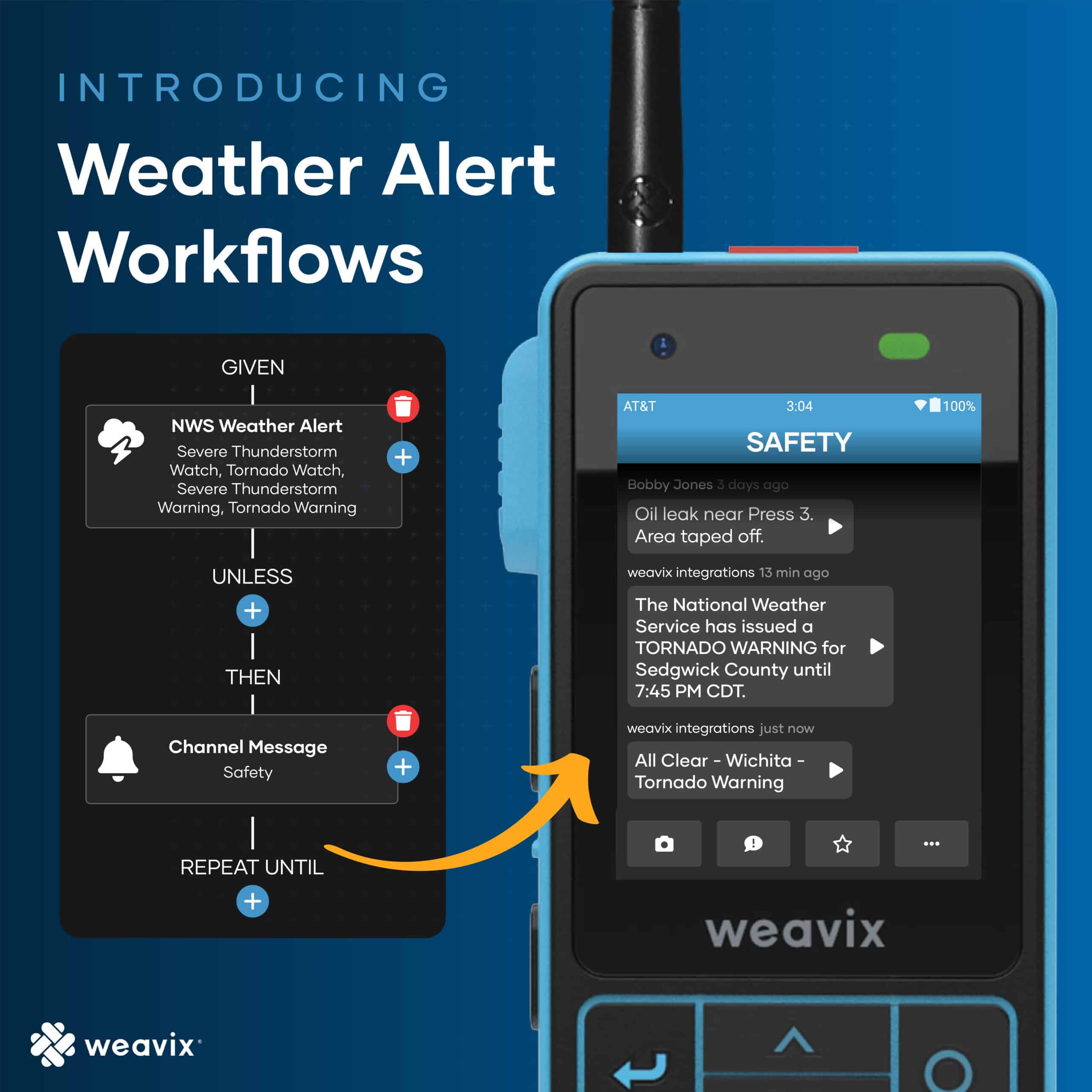
There’s no commercial weather service to connect and no system to wire in. If your sites run the Workforce Safety package or the legacy Protect package, Weather Alerts work out of the box, and there is no change to package pricing.
Why Do Manual Weather Alerts Fail Frontline Crews?
Manual weather alerts fail because they depend on one person being free at the right moment. Someone has to keep an eye on the weather, notice when a warning comes out, decide it applies to the site, and press a button to send the alert. If your inclement weather policy names someone to watch for warnings, that’s the step Automatic Weather Alerts take off their plate.
If that person is in a meeting, on a call, or out on the floor doing their own job, the warning waits too. Severe weather doesn’t, and the stakes are real: a U.S. worker died on the job every 104 minutes in 2024 (BLS Census of Fatal Occupational Injuries, 2024). A warning only protects someone if it reaches them and they understand it.
Automatic Weather Alerts close that gap. Crews are safer because the warning reaches every one of them on its own, read aloud and on the record. Work keeps moving because the person who used to watch the sky gets back to their own job.
How Do Automatic Weather Alerts Compare to Manual Alerts?
Automatic alerts go out soon after the National Weather Service issues an alert for your site, with no one watching the radar or pressing a button. Manual alerts go out only when someone notices the warning and has time to send it. The table below shows the difference.
| Manual weather alerts | Automatic Weather Alerts | |
|---|---|---|
| Who watches for warnings | A supervisor or safety manager | weavix, using National Weather Service warnings for your site |
| Who sends the alert | That same person, by pressing a button | No one. It goes out on its own |
| When the alert goes out | When someone notices | Soon after the National Weather Service issues it |
| How workers get it | Depends on who sends it and how | Read aloud on Walt |
| Integration needed | Varies by site | None |
| Setup | Ongoing, every storm | Once per site, in Workflows |
How Do You Set Up an Automatic Weather Alert System?
You set up Automatic Weather Alerts in Workflows, the same place you already route SOS calls, inspections, and field reports to the right people, in three steps:
- Create a weather workflow for your site. Each workflow covers one site and uses its existing location in weavix, so there’s no extra location setup.
- Pick the alerts that matter. Choose one or more National Weather Service alert types: Tornado, Severe Thunderstorm, Flash Flood, Hurricane, Extreme Wind, Winter Storm, and Blizzard Warnings, plus Tornado, Severe Thunderstorm, and Flash Flood Watches.
- Choose who hears it. Send the alert to everyone on site, to the safety team only, or to supervisors only.
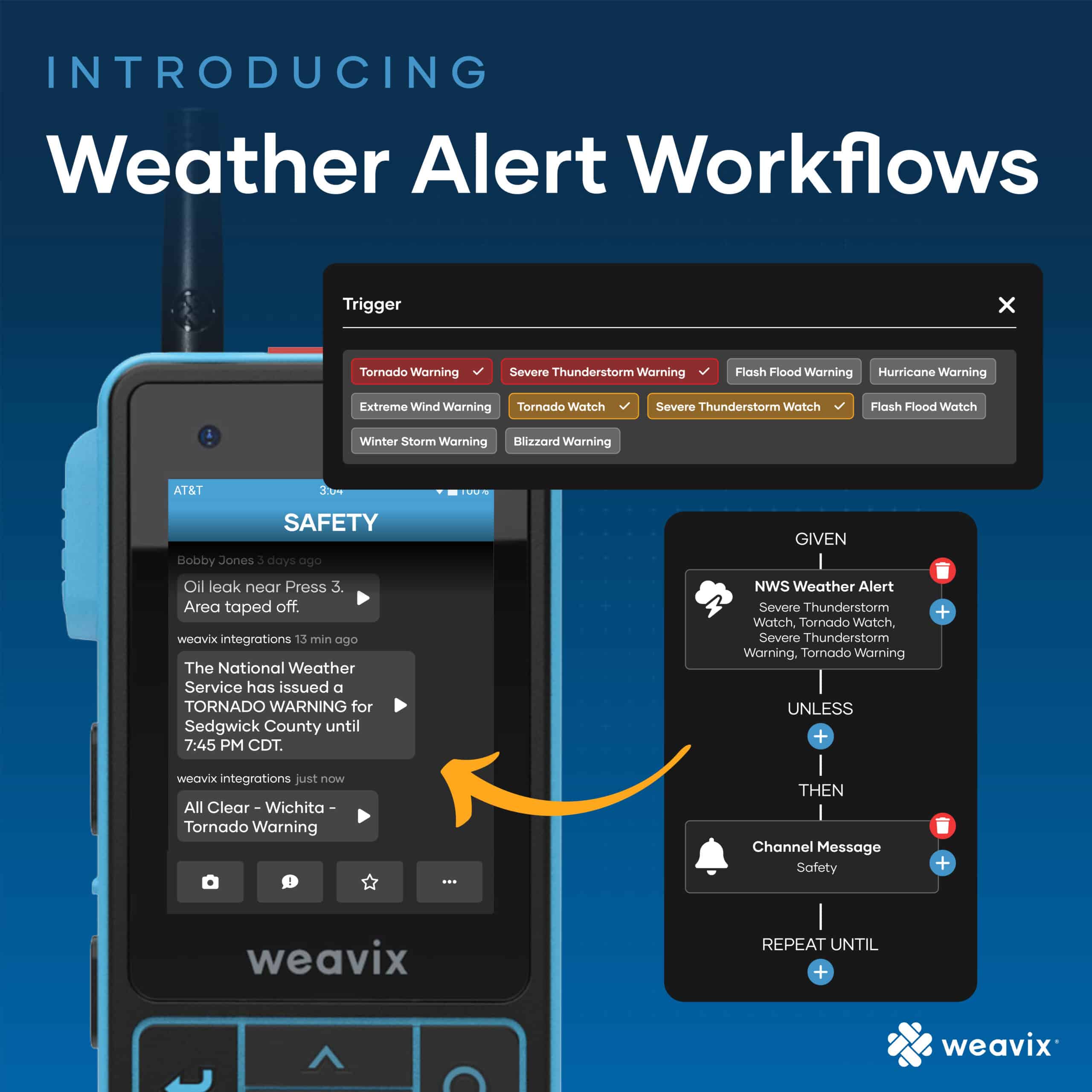
From there, it runs on its own. When a matching alert is issued for your site, it goes out through the weavix alerting system and is read aloud on every Walt in the group. Supervisors can see who received and confirmed it. You can set up as many weather workflows for a site as you need, each with its own alert types, recipients, and message.
How Should Watches and Warnings Reach Your Crew?
You decide, because each workflow can handle a different alert type. A Watch means conditions are favorable for dangerous weather to develop, so it works well as a quiet heads-up to the safety team. A Warning means the event is happening or about to and calls for immediate action, so it’s the one to send to everyone on site.
Here’s how two workflows play out on a typical day:
- 10:00 a.m. A Severe Thunderstorm Watch is issued for your area. weavix sends a quiet FYI to the safety channel, and crews keep working.
- 2:15 p.m. The storm forms and a Severe Thunderstorm Warning is issued for your site. weavix sends a high-priority alert to everyone on site, read aloud on every Walt, with the National Weather Service instructions included.
- Moments later. Crews are already moving to shelter. Nobody had to spot the warning, and nobody had to press a button.
Matching the response to the risk keeps every alert meaningful. When Walt speaks up about the weather, your crew knows it’s time to move.
Frequently Asked Questions
Which sites can use Automatic Weather Alerts? Automatic Weather Alerts work for sites in all 50 US states, because the alerts come from the National Weather Service. Each workflow covers one site and uses that site’s existing location in weavix, so a company with several locations sets up workflows per site, each with its own alert types and its own list of who hears the alert.
What is the difference between a weather Watch and a Warning? A Watch means conditions are favorable for dangerous weather to develop, so it’s a heads-up to prepare. A Warning means the event is happening or about to and calls for immediate action, such as taking shelter. With Automatic Weather Alerts, admins choose each response, like a quiet FYI for a Watch and a site-wide alert for a Warning.
How do you alert workers about severe weather on a loud job site? Make the warning something workers hear, not something they have to look up. With Automatic Weather Alerts, the National Weather Service warning is read aloud on Walt, so workers get it right where they are, without stopping to check a phone or a screen. Supervisors can then see who received and confirmed the alert.
Do Automatic Weather Alerts include lightning alerts? Not today. Automatic Weather Alerts cover National Weather Service Warnings and Watches, such as Tornado, Severe Thunderstorm, and Flash Flood alerts, and lightning alerts are not part of the feature yet. For customers with an immediate need for lightning alerts, weavix can set up an integration with Perry Weather alongside their Weather Alert workflows.
Do I need a commercial weather service to use Automatic Weather Alerts? No. There is nothing to integrate: no API keys, no Zapier, and no commercial weather service subscription. Automatic Weather Alerts use the free, public National Weather Service feed and work out of the box with the Workforce Safety package or the legacy Protect package. Set up a workflow for each site, and the alerts run on their own.
Does adding Automatic Weather Alerts change my pricing? No. Automatic Weather Alerts do not change the price of the Workforce Safety package or the legacy Protect package. Any customer with either package enabled can set up Weather Alert workflows in weavix Workflows and start sending National Weather Service alerts to their crews automatically, with no added cost for the feature.
Start Here
If someone on your team is still watching the weather and pressing the button, two pages are worth a look before you book a demo:
- How weavix Workflows route every alert to the right people
- How the weavix alerting system shows who received and confirmed every alert
weavix is your Direct Line to your Frontline, and now it watches the weather too. When you’re ready to see Weather Alerts set up for your site: