Skip to content

Frontline Workflow Automation

Workflow Automation for Industrial Frontline Teams

Traditional communication tools stop at the message. With Walt and weavix workflow automation, every frontline event — SOS, form submission, geofence trigger, or field report — automatically routes to the right people and creates a real-time operational record. Walt is the IoT radio built for the frontline. weavix workflow automation is the system that turns what workers communicate into the next action.

Walt is the frontline communication device. weavix workflow automation is the system that turns communication into the next action.

Event captured
SOS, form submission, geofence trigger, or frontline issue report.

Workflow automation routes action
The right alert, task, or notification goes to the right people.

Record created
Teams can see what happened, who was notified, and what followed.

weavix Workflows

Trusted By Frontline Organizations

certainteed
campbells
panasonic
Kraft
Hilton

Traditional Communication Tools Stop At the Message

Messages get missed. Follow-up depends on people instead of systems. And when communication disappears the moment it is spoken, teams have no reliable way to improve response, routing, or accountability.

  • message

    Messages get missed

    Critical updates do not always reach the right people at the right time. A message may be heard late, misunderstood, or never acted on at all.

  • people

    Follow-up depends on people

    Manual coordination, memory, and human delay end up carrying too much of the process. Teams have to remember what comes next instead of relying on a system.

  • Cloud

    No system of record

    When communication leaves no documented trail, leaders lose traceability. That makes process improvement, investigation, and accountability much harder.

Walt Captures Communication. weavix Workflow Automation Moves It Forward.

Walt gives frontline teams a faster, smarter way to communicate. weavix workflow automation extends that value by turning communication events into next steps. Instead of stopping at the message, communication can trigger alerts, route information, and create a documented record teams can act on.

The result is a clearer operational system. The frontline communicates in real time. Workflow automation makes sure the event leads to the right action and the right record.

Walt smart radio workflow automation for frontline teams

Walt Captures Communication. weavix Workflow Automation Moves It Forward.

How Workflow Automation Works

The goal is not to add complexity. It is to make sure communication leads to the right action, the right routing, and a record your team can trust.

  • Step 1

    A communication event happens

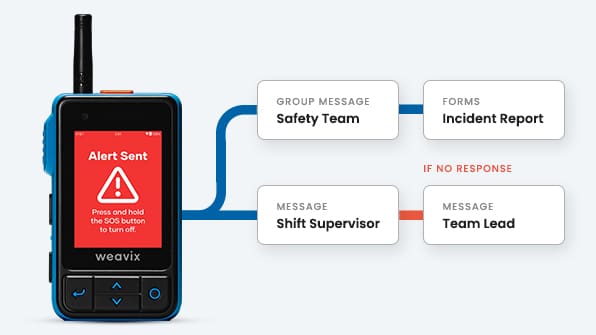
    A worker triggers SOS on their Walt smart radio, submits a digital form, enters a geofenced area, or reports an issue from the field. Walt captures the event and passes it to the workflow automation system.

    ✅ Emergency event or worker-down alert
    ✅ Inspection, request, or report submission
    ✅ Location-triggered operational event

  • Step 2

    Automation routes the response

    The system sends the right alert, task, or notification to the right people based on the event and its context.

    ✅ Route by team, role, site, or event type
    ✅ Trigger escalation when faster action is needed
    ✅ Reduce manual handoffs and avoidable delay

  • Step 3

    The event is recorded

    Teams can see what happened, who was notified, and what action followed. That creates better operational visibility and stronger accountability.

    ✅ Document workflow activity and alert history
    ✅ Support review, reporting, and oversight
    ✅ Help teams learn from what happens in the field

Three Ways Workflow Automation Helps Frontline Teams Move Faster

Buyers understand workflow automation fastest when it is tied to concrete operational situations. These three use cases are the clearest place to show the value.

Emergency response and SOS escalation

Safety workflow example

When a worker triggers SOS or an emergency event occurs, workflow automation helps route alerts to the right responders fast. Teams can escalate safety events, notify the right personnel, and improve response when every second matters.

Operational benefit: faster response with clearer routing and fewer missed handoffs in urgent situations.

Digital forms, inspections, and frontline reporting

Forms workflow example

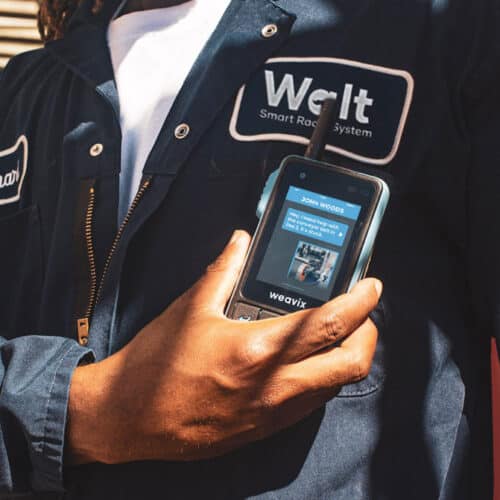
Routine frontline communication should not disappear into radio chatter or manual notes. Workflow automation helps turn submitted forms, inspections, and reports into trackable next steps that keep work moving and reduce follow-up delays.

Operational benefit: cleaner handoffs, faster follow-through, and less time chasing down routine process updates.

Location-based workflows and geofence triggers

Geofence workflow example

Some events matter because of where they happen. Workflow automation can trigger notifications and actions based on defined areas, helping teams respond faster in restricted zones, safety-sensitive spaces, or key operational checkpoints.

Operational benefit: more precise action based on the event and its location, not just a broad message to everyone.

Safety workflow example
Forms workflow example
Geofence workflow example

Built to Support Real Frontline Workflows

These capabilities help the use cases work in the field. Keep them scannable and tied to operational value.

  • features icons

    SOS-triggered escalation

    Support faster response by automatically moving urgent events to the right responders.

  • Geofence-based triggers

    Use location to drive more precise workflow actions in defined operational areas.

  • Form submission routing

    Turn submitted field data into trackable next steps instead of static records.

  • Acknowledgement tracking

    See when critical alerts are received and reduce ambiguity around follow-through.

  • arrow clock

    Alert history

    Create a clearer timeline around events, routing, and response activity.

  • Multimedia context

    Add photos or supporting detail so teams understand the event faster.

  • quote

    Translation support

    Improve clarity across multilingual frontline environments where precision matters.

  • report

    Event documentation

    Support reporting, review, and accountability with a stronger operational record.

What Teams Gain with Workflow Automation

This is where the page shifts from what the system does to what the customer gets from it. Workflow automation helps teams move from reactive communication to organized action. That means less guesswork, faster coordination, and more confidence across the frontline.

Forms on a Walt Smart Radio

Faster response

Reduce the delay between message and action by making the next step part of the system, not an afterthought.

More precise communication

Route information based on the event, the people involved, and the context so teams deal with less ambiguity.

Better accountability

Create a clear record of what happened and what happened next so leaders can review, improve, and respond with confidence.

Related Resources

  • Milwaukee tool frontline workers using the Walt Smart Radio

    Smart Radio Case Studies

    Innovations in frontline communications, from our clients' perspective.

    Case Studies
  • two way radio system

    The Comprehensive Smart Radio Guide

    A smart radio is a new category of industrial communication device, purpose-built for modern...

    Learn More
  • Walt Smart Radio Surpasses 2 Billion Messages

    Walt Smart Radio System Demo

    The Walt Smart Radio System is far more than just another two-way radio - it’s a frontline worker...

    Watch Video
  • Frustrated worker

    Every Plant Has Blind Spots. How Costly are Yours?

    Unreported delays, near-misses, and overlooked bottlenecks might seem small, but together stall...

    Learn More

Frequently Asked Questions

What is weavix workflow automation?

weavix workflow automation connects frontline communication to structured operational follow-up. When a worker triggers SOS, submits a form, or crosses a geofence boundary, the system routes the right alert to the right people, documents what happened, and creates a record teams can act on. It turns communication into a managed process instead of a message that disappears.

How does workflow automation work with Walt devices?

Walt is an IoT smart radio that captures frontline communication events in real time. When an event occurs — an SOS trigger, a form submission, a location-based alert — weavix workflow automation routes it automatically. Teams get faster response, cleaner handoffs, and a documented trail without manual coordination.

Can workflow automation support emergency alerts?

Yes. SOS escalation is one of the primary use cases. When a worker triggers SOS on their Walt radio, the system routes the alert to the right responders based on role, team, or site. Escalation paths are defined in advance so urgent events move fast without depending on manual handoffs.

Can workflows be triggered by forms or location?

Yes. Form submissions from Walt devices can automatically trigger next steps — routing reports, creating tasks, or logging submissions. Geofence triggers work the same way: when a worker enters or exits a defined area, the system routes an alert or initiates the right response sequence based on that event.

What does workflow automation help improve?

Workflow automation helps industrial and construction frontline teams improve response speed, reduce manual coordination, and create accountability across field operations. Instead of relying on people to remember what comes next, the system routes the right action automatically and creates a record that supports review, reporting, and continuous improvement.