

 Aaron Cohen
TLDR: Squelch is the setting that keeps a radio quiet until a real signal arrives. CTCSS and DCS are sub-audible codes that make a radio open its squelch only for transmissions that carry the matching code. They cut background chatter on a shared channel, but they are not encryption and do not make a channel private.
What is squelch on a radio?
Squelch is a circuit that mutes the speaker when no useful signal is coming in. Without it, an idle radio plays constant static. With it, the radio stays silent until a transmission is strong enough to open the squelch, and then you hear the voice.
Most radios let you adjust the squelch level. Set it too low and static keeps breaking through. Set it too high and weak but real calls never open the speaker. That second problem is the one that costs crews time, because a worker at the edge of coverage can be talking while everyone else hears nothing.
What is CTCSS?
CTCSS stands for Continuous Tone-Coded Squelch System. It adds a low-frequency tone, below the range of normal speech, to every transmission. A receiver set to the same tone opens its squelch only when it hears that tone. Other transmissions on the same frequency stay muted.
Radio makers also call these tones PL tones or privacy codes. The available tones are usually listed in a tone chart in the radio’s manual. Crews pick one tone per group so the warehouse team does not hear the maintenance team.
How do you choose a CTCSS tone?
Pick one tone per working group and write it down where every user can find it. Keep groups that share a frequency on different tones, and avoid tones that sit next to each other on the chart, since radios can confuse close values. Then program the same tone on every radio in the group, and test with a radio that is set to a different tone to confirm it stays muted.
What is DCS, and how is it different from CTCSS?
DCS stands for Digital Coded Squelch. Instead of a continuous analog tone, it sends a low-speed digital code with the transmission. The receiver opens only when it decodes the matching code. The purpose is the same as CTCSS: keep unwanted traffic off your speaker.
In practice the difference is the signal type. CTCSS is an analog tone. DCS is a digital code. Both radios in a conversation need to use the same method and the same value, or the receiving radio will stay silent.
Does CTCSS make a channel private?
No. CTCSS and DCS control who your radio listens to. They do not control who can listen to you. Anyone on the same frequency with their squelch open, or with a radio set to monitor, can still hear the conversation. If the content is sensitive, a tone code is not protection.
Why can’t I hear anyone on my walkie-talkie?
When a radio goes quiet, check these in order:
- Tone or code mismatch. One radio is set to a CTCSS tone or DCS code the other does not share.
- Squelch level too high. Weak signals never open the speaker.
- Different channel or frequency. A single wrong channel setting looks exactly like a dead radio.
- Out of range. Steel, concrete, and distance weaken the signal below the squelch threshold.
To turn CTCSS off on most handhelds, set the tone to “off” or “none” for that channel. The radio then opens on any signal, including interference.
What do squelch, CTCSS, and DCS mean in short?
- Squelch: mutes the speaker until a signal opens it.
- CTCSS (PL tone): a sub-audible analog tone the receiver must hear before it opens.
- DCS: a digital code that does the same job.
- Privacy: none. Anyone on the frequency can still listen.
Do you still need squelch and tone codes at all?
Squelch and tone codes exist to solve one problem: many people sharing a few radio channels without hearing each other’s traffic. They work, but every fix on this page is a workaround for the same limit. Channels are scarce, coverage depends on line of sight and repeaters, and every radio has to be set up by hand and kept matched. One mismatched radio means a missed call, and there is no record of who said what.
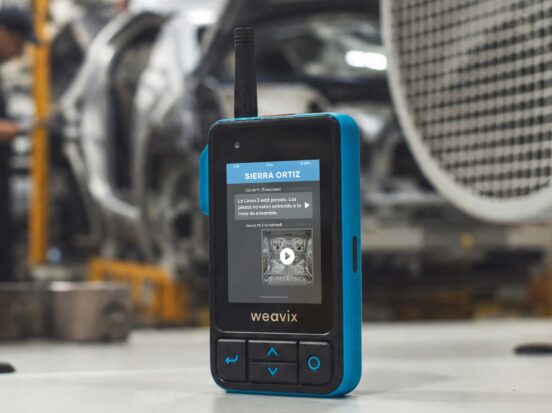
The Walt® Smart Radio System by weavix removes that problem instead of managing it. Walt works like the push-to-talk radio your crews already trust. You press, you talk, the right people hear you. The difference is what runs underneath.
At a Kraft Heinz plant in Champaign, Illinois, a manager’s response time to an issue dropped from 9 minutes to 20 seconds with Walt and a speaker mic. Teams in the loudest departments said they could hear calls clearly over the noise.
How do tone-coded radios compare with a smart radio?
| Tone-coded radios | Walt Smart Radio System | |
|---|---|---|
| Who hears your call | Whoever shares your channel and tone | The channel you are on, set up in software, with no tones or codes to match |
| Coverage | Line of sight, plus repeaters and licensing for a larger site | LTE and Wi-Fi, including private wireless networks, with no repeaters and no FCC license |
| Setup and changes | Program each radio, one at a time | Channels set up in software by role, line, or area |
| Language | You hear what was said, in the language it was said | Messages translated in 26+ languages with automatic dialect detection |
| Record of what happened | None | Every message in a searchable, timestamped record |
| Safety | A voice call and nothing more | An SOS man-down button that sends the worker’s ID and location |
None of this means squelch is wrong. If you run a handful of radios on one channel, tone codes may be all you need. But if your crews are spread across a large site, work in loud or hard-to-cover areas, or speak more than one language, the question stops being which tone to pick and becomes whether the radio should be doing more of the work.
Comparing options? Read what a smart radio is and how to choose one, or see how radio alternatives compare. New to channel talk? Our guide to walkie-talkie code words covers the language crews use on the air.
Frequently asked questions
What does squelch do on a radio?
Squelch mutes the speaker when no useful signal is coming in, so an idle radio stays quiet instead of playing static. When a transmission is strong enough to open the squelch, you hear the voice. Set the level too high, though, and weak but real calls never open the speaker.
What is the difference between CTCSS and DCS?
CTCSS sends a continuous sub-audible analog tone with each transmission. DCS sends a low-speed digital code instead. Both do the same job, which is opening the receiver only for matching transmissions, but the radios in a conversation must use the same method and the same value.
Does CTCSS make a radio channel private?
No. CTCSS and DCS control which transmissions your radio plays. They do not stop anyone else on the frequency from hearing you, and they are not encryption. A scanner, or a radio with its tone set to off, still hears the whole conversation, so keep sensitive details off a shared channel.
How do I turn off CTCSS on a handheld radio?
On most handhelds, set the tone to “off” or “none” for that channel in the radio’s menu. The radio will then open on any signal on the frequency, including interference, so expect more noise. Menus differ between makers, so check the manual for your model before you change a setting your crew depends on.
Why can’t I hear anyone on my radio when the channel is right?
The most common causes are a CTCSS tone or DCS code mismatch between radios, a squelch level set too high, or a weak signal from distance, steel, or concrete. Check the tone and code first, then squelch, then range. If one radio still stays silent, compare its settings with a radio that works.
Do I need CTCSS tones on a smart radio?
No. The Walt Smart Radio System runs over LTE and Wi-Fi, including private wireless networks, rather than a shared radio channel, so there are no tone codes to match. Channels are set up in software by role, line, or area instead of radio by radio, and there is no FCC license to manage.
Start here
If tone codes, channel limits, and coverage gaps are slowing your crews down, request a demo and see how Walt handles the same job without them.
